RowHeader
RowHeader represents the control displayed as row header that can perform row selection and row resizing operation, as demonstrated in AdventureWorksLT.WpfApp sample:
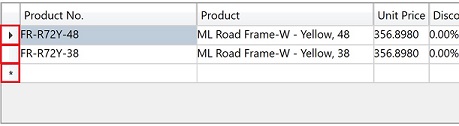
Features
- Row selection.
- Row resizing via drag-and-drop.
Usage
Put the RowHeader inside a RowView, it will be wired up and work automatically.
You can add RowHeader via row binding by calling BindTo API, as demonstrated in AdventureWorksLT.WpfApp sample:
protected override void BuildTemplate(TemplateBuilder builder)
{
    builder
        ...
        .AddBinding(0, 1, _.BindTo<RowHeader>())
        ...;
}
You can also add RowHeader via composite row binding.
Resizing Implementation
Resizing is implemented via RowHeader.IsResizeGripper attached property. In the control template of RowHeader, an UIElement with this attached property value set to true will detect the mouse drag-and-drop and perform the row resizing operation.
Styles
| Style | Description |
|---|---|
| Flat | Displays RowHeader as flat. |